minstudio

커맨드 패턴 (Command)

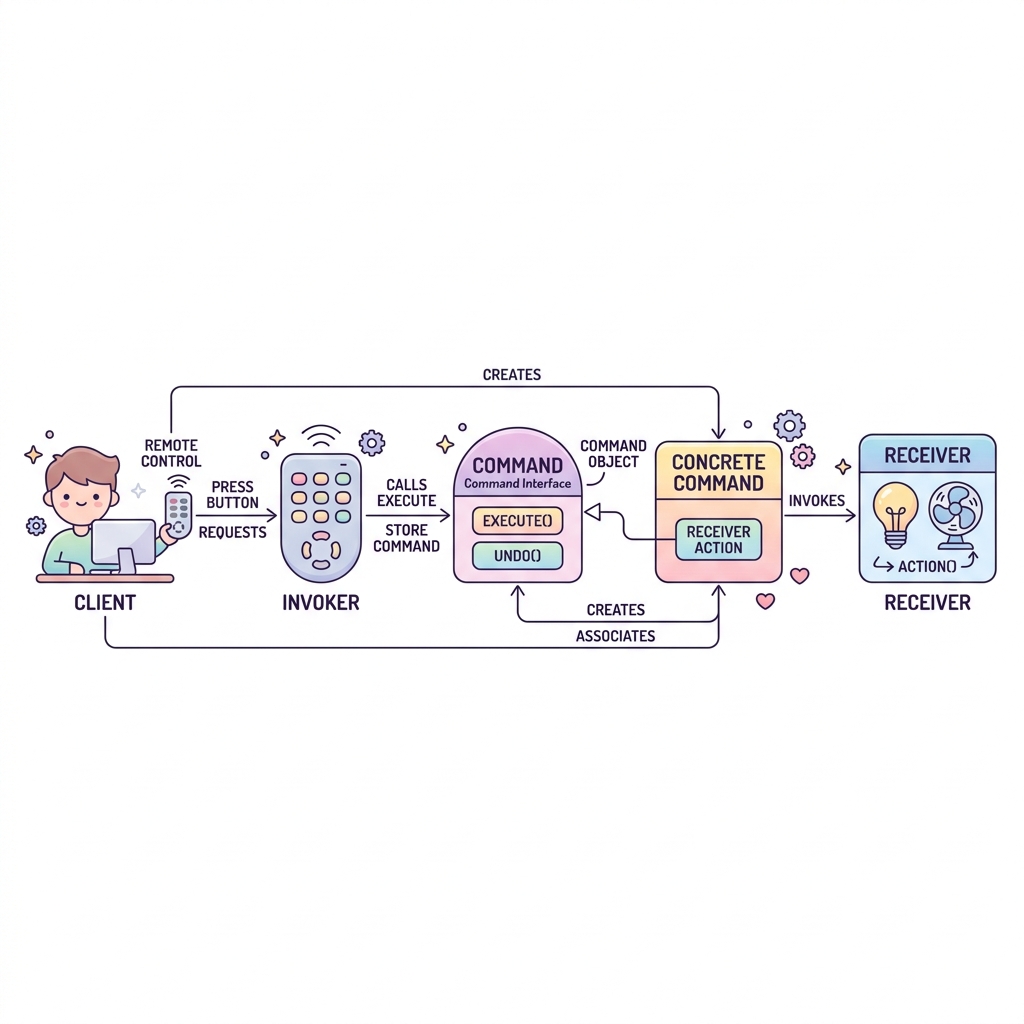
커맨드 패턴(Command Pattern)은 요청(명령) 자체를 객체로 캡슐화하여, 메서드 인자로 전달하거나, 큐(Queue)에 저장해 순차적으로 실행하거나, 심지어 실행 취소(Undo) 기능을 구현할 수 있게 해주는 행위 패턴입니다.

스마트홈 앱에서 하나의 버튼에 'TV 켜기', '조명 끄기', '에어컨 켜기' 등 여러 기능을 자유롭게 매핑하고 싶다면 버튼 클래스 안에 기기 제어 코드를 하드코딩해서는 안 됩니다. 명령(Command) 객체를 만들어 버튼에 꽂아주면, 버튼은 단지 command.execute()만 호출하는 바보(단순한 Invoker)가 되어 극도의 유연성을 확보할 수 있습니다.

🕹️ Command: 명령을 객체로 포장하여 버튼에 꽂아넣기 Invoker (리모컨) 버튼 command.execute() << Command >> LightOnCmd execute() -> light.on() TvOnCmd execute() -> tv.on() Receiver: 조명 Receiver: TV 버튼은 어떤 명령이 들어있는지 모르고 그저 누를 뿐, 실제 동작은 커맨드 객체가 수신자에게 지시합니다.
interface Command {
    void execute();
}

class Light {
    public void on() { System.out.println("조명 켜짐"); }
    public void off() { System.out.println("조명 꺼짐"); }
}

class LightOnCommand implements Command {
    private Light light;
    public LightOnCommand(Light light) { this.light = light; }
    public void execute() { light.on(); }
}

class LightOffCommand implements Command {
    private Light light;
    public LightOffCommand(Light light) { this.light = light; }
    public void execute() { light.off(); }
}

class RemoteControl {
    private Command button;
    public void setCommand(Command command) { this.button = command; }
    public void pressButton() { button.execute(); }
}

public class Main {
    public static void main(String[] args) {
        Light livingRoomLight = new Light();
        Command lightOn = new LightOnCommand(livingRoomLight);
        Command lightOff = new LightOffCommand(livingRoomLight);
        
        RemoteControl remote = new RemoteControl();
        remote.setCommand(lightOn);
        remote.pressButton(); // 조명 켜짐
        
        remote.setCommand(lightOff);
        remote.pressButton(); // 조명 꺼짐
    }
}
커맨드 패턴 (Command) | Minstudio