minstudio

고급 라우팅 2: 가로채기 라우트 (Intercepting Routes)

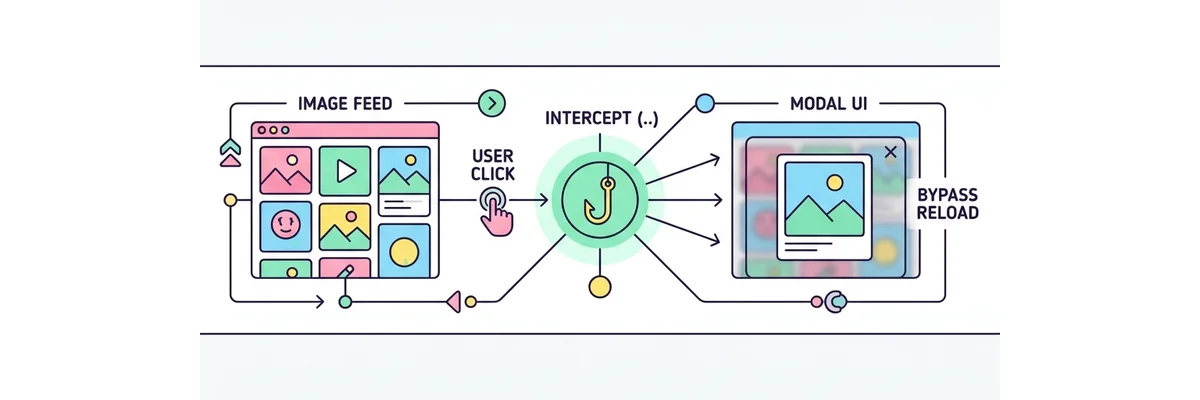
가로채기 라우트(Intercepting Routes)는 사용자가 링크를 클릭했을 때 브라우저의 현재 상태(Context)를 잃지 않고, 라우트 이동을 "가로채서" 모달(Modal) 형태로 띄워주는 고급 UX 기술입니다.

인스타그램 피드에서 사진을 클릭하면 모달로 뜨지만, 새로고침 하거나 URL을 직접 공유하면 단독 페이지로 열리는 기능이 바로 이 기술로 구현됩니다. (..)folder 형태의 네이밍 컨벤션을 사용합니다.

🚀 라우트 가로채기 (Intercepting Routes) 원리 Feed 화면 (/feed) Click! 새로고침 또는 직접 접속 시 (Hard Navigation) /photo/1 (단독 페이지) 가로채기! (Soft Navigation) Feed 화면 배경 유지됨 Modal Overlay (..)photo/1
// ==========================================
// 📂 app/feed/layout.tsx
// 병렬 라우트(@modal)와 결합하여 모달을 구현합니다.
// ==========================================
export default function FeedLayout({
  children,
  modal // 이 슬롯에 가로챈 라우트 컴포넌트가 들어옵니다!
}: { children: React.ReactNode, modal: React.ReactNode }) {
  return (
    <>
      {children} {/* 피드 리스트 */}
      {modal}    {/* 모달 오버레이 영역 */}
    </>
  )
}

// ==========================================
// 📂 app/feed/@modal/(..)photo/[id]/page.tsx
// 링크 클릭 시 /photo/[id] 로의 이동을 가로챕니다!
// ==========================================
import { Modal } from '@/components/Modal'
import { getPhoto } from '@/lib/db'

export default async function PhotoInterceptedModal({
  params
}: { params: { id: string } }) {
  const photo = await getPhoto(params.id)
  
  // 사용자는 페이지 이동 없이 그 자리에 모달이 뜨는 것을 경험합니다.
  // URL은 정상적으로 /photo/1 등으로 변경되어 뒤로가기도 완벽 지원됩니다.
  return (
    <Modal>
      <img src={photo.url} alt={photo.title} className="w-full rounded-xl" />
      <h2 className="text-xl font-bold mt-4">{photo.title}</h2>
    </Modal>
  )
}
고급 라우팅 2: 가로채기 라우트 (Intercepting Routes) | Minstudio