minstudio

서버 액션 (Server Actions)과 데이터 뮤테이션

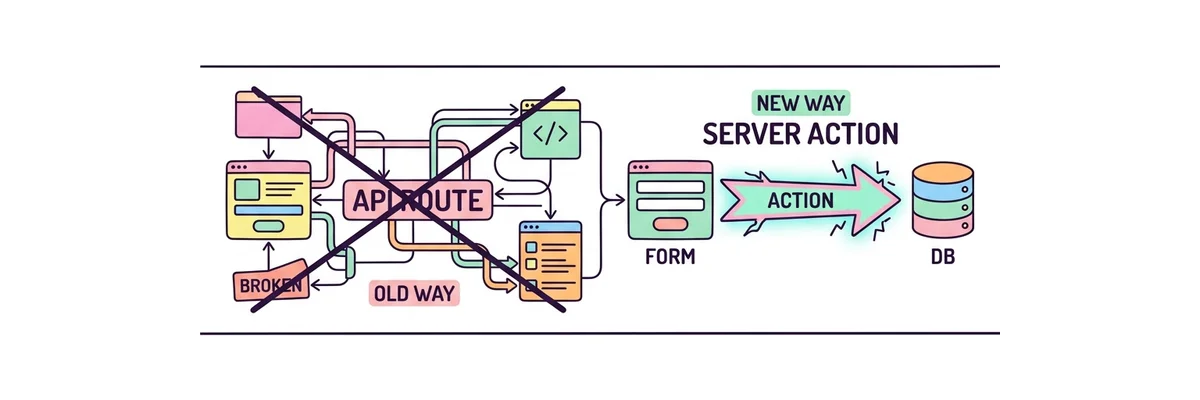
웹 개발에서 가장 귀찮은 작업 중 하나는 폼(Form) 데이터를 전송하기 위해 별도의 API(백엔드 엔드포인트)를 만들고, 프론트엔드에서 fetch로 호출하는 과정입니다. Next.js 14의 서버 액션(Server Actions)은 이 번거로운 과정을 완벽하게 지워버립니다.

⚡ 기존 API vs Server Actions 비교 기존 방식 (API 라우트) 클라이언트 (Form) fetch() 호출 API 서버 (/api/...) DB 저장 데이터베이스 (DB) ❌ 복잡한 상태 관리와 예외 처리 필요 Server Actions (Next.js 14) 클라이언트 (Form) 서버 함수 즉시 실행! 데이터베이스 (DB) ✅ "use server" 선언만으로 DB에 직행 ✅ JS가 꺼져 있어도 폼 전송 가능

Server Actions의 마법 같은 특징

  • API 엔드포인트 불필요: /api/submit 같은 별도의 라우트를 만들 필요 없이, 컴포넌트 내부에서 함수 하나만 만들면 끝납니다.
  • "use server" 디렉티브: 함수의 최상단에 이 마법의 단어를 적으면, Next.js가 알아서 이 함수를 서버에서만 실행되는 보안 통신(RPC)으로 변환해 줍니다.
  • 완벽한 캐시 갱신 (revalidatePath): DB에 데이터를 넣은 직후 화면의 리스트를 새로고침 하고 싶다면, 상태 관리가 아니라 단지 revalidatePath('/') 한 줄이면 최신 데이터를 즉시 불러옵니다.
// ==========================================
// 📂 app/page.tsx
// 서버 액션(Server Actions)을 사용한 게시글 작성
// ==========================================
import { revalidatePath } from 'next/cache';

// 1️⃣ 데이터베이스에 접근하는 마법의 서버 함수 (API 라우트 불필요!)
async function createPost(formData: FormData) {
  "use server"; // 이 함수는 절대로 브라우저로 전송되지 않고 서버에서만 실행됩니다!

  // 폼에서 전송된 데이터 추출
  const title = formData.get('title') as string;
  const content = formData.get('content') as string;

  // 바로 데이터베이스에 저장해버림 (완벽한 보안)
  await db.post.create({
    data: { title, content }
  });

  // 2️⃣ 저장이 완료되면 '/posts' 경로의 캐시를 박살내고 화면을 최신화!
  revalidatePath('/posts');
}

export default function ServerActionDemo() {
  return (
    <div className="p-8 max-w-xl mx-auto border rounded-xl bg-white shadow-sm mt-10">
      <h2 className="text-2xl font-bold mb-6 text-gray-800">새 글 작성</h2>
      
      {/* 3️⃣ 기존의 onSubmit, e.preventDefault(), fetch()... 전부 버리세요! 
          그냥 action 속성에 함수만 넘겨주면 Next.js가 다 알아서 처리합니다. */}
      <form action={createPost} className="space-y-4">
        
        <div>
          <label className="block text-sm font-semibold text-gray-700 mb-1">제목</label>
          <input 
            type="text" 
            name="title" // name 속성이 서버 액션 formData의 Key가 됩니다.
            required 
            className="w-full border p-2 rounded-lg"
          />
        </div>
        
        <div>
          <label className="block text-sm font-semibold text-gray-700 mb-1">내용</label>
          <textarea 
            name="content" 
            required 
            className="w-full border p-2 rounded-lg h-32"
          />
        </div>
        
        <button 
          type="submit" 
          className="w-full bg-blue-600 text-white font-bold py-3 rounded-lg hover:bg-blue-700 transition"
        >
          저장하기
        </button>
      </form>
    </div>
  );
}
서버 액션 (Server Actions)과 데이터 뮤테이션 | Minstudio