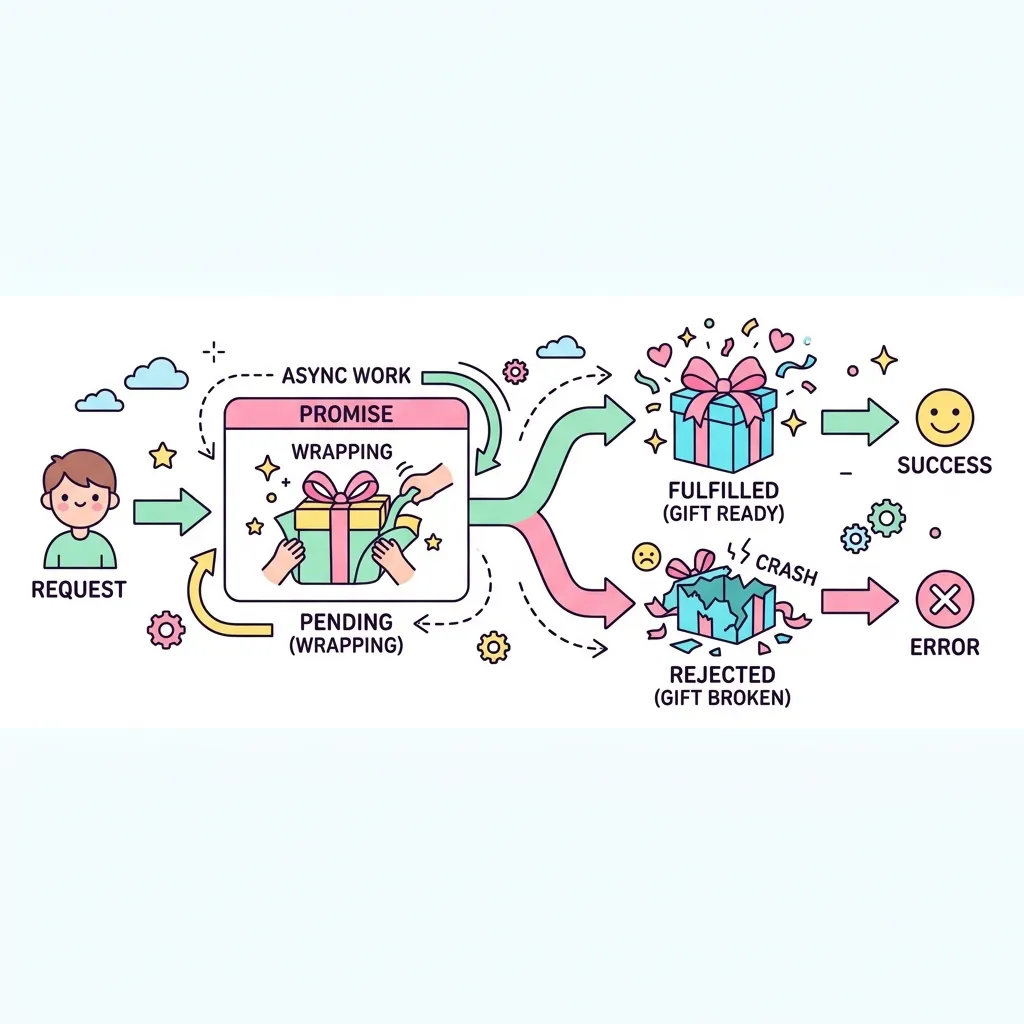
과거에는 비동기 처리 결과를 받기 위해 함수 안에 함수를 끊임없이 집어넣는 무시무시한 "콜백 지옥(Callback Hell)"에 시달렸습니다. 이를 해결하고 비동기 코드를 깔끔한 체인(.then().catch()) 형태로 연결하기 위해 등장한 표준 객체가 바로 Promise입니다.
진동벨 (Promise)의 3가지 상태
Pending(대기 중)
➡️
Fulfilled.then() 성공
Rejected.catch() 실패
🔥 심화 예제: Promise Chaining과 Promise.all의 결합
실무에서는 여러 개의 비동기 작업을 섞어서 처리하는 경우가 많습니다. 아래 예제는 "유저 정보를 먼저 가져오고, 그 유저의 정보(ID)를 바탕으로 게시글과 댓글을 동시에(병렬로) 가져오는" 복잡한 시나리오를 구현한 코드입니다. 개발자 콘솔에 찍히는 메시지의 순서를 관찰해 보세요!
promise-all-example.js
// 가상의 API 함수들 (setTimeout으로 딜레이 모방)
const fetchUser = (id) => new Promise(resolve => {
  console.log(`[API] 유저 ${id} 정보 요청 중...`);
  setTimeout(() => resolve({ id, name: '개발자 민수' }), 1000);
});

const fetchPosts = (userId) => new Promise(resolve => {
  console.log(`[API] 유저 ${userId}의 게시글 요청 중...`);
  setTimeout(() => resolve(['React Promise 기초', '비동기 마스터하기']), 1500);
});

const fetchComments = (userId) => new Promise(resolve => {
  console.log(`[API] 유저 ${userId}의 댓글 요청 중...`);
  setTimeout(() => resolve(['좋은 글 감사합니다!', '도움이 되었습니다.']), 1000);
});

console.log('--- 데이터 로딩 시작 ---');
const userId = 1;

// 1. 유저 정보를 먼저 가져옵니다 (순차적)
fetchUser(userId)
  .then(user => {
    console.log('👤 유저 정보 로드 완료:', user.name);

    // 2. 유저 정보를 바탕으로 게시글과 댓글을 병렬로 요청 (Promise.all)
    console.log('⚡ 게시글과 댓글을 동시에 요청합니다 (Promise.all)');
    return Promise.all([
      fetchPosts(user.id),
      fetchComments(user.id)
    ]).then(([posts, comments]) => {
      return { user, posts, comments };
    });
  })
  .then(data => {
    console.log('✅ 모든 데이터 로드 완료!');
    console.log(`- 이름: ${data.user.name}`);
    console.log(`- 작성한 글: ${data.posts.join(', ')}`);
    console.log(`- 작성한 댓글: ${data.comments.join(', ')}`);
  })
  .catch(error => {
    console.error('에러 발생:', error);
  })
  .finally(() => {
    console.log('--- 데이터 로딩 종료 ---');
  });
localhost:8000/preview
// Promise: "지금 당장은 데이터가 없지만, 나중에 성공/실패 결과를 무조건 줄게" 라는 약속 증서
const orderPizza = new Promise((resolve, reject) => {
    // 2초 걸리는 피자 굽기 시뮬레이션
    setTimeout(() => {
        const isBurned = false; // 타버렸는지 여부
        if (!isBurned) {
            resolve("🍕 맛있는 피자 완성!"); // 성공 시 데이터 반환
        } else {
            reject("🔥 피자가 타버렸습니다..."); // 실패 시 에러 반환
        }
    }, 2000);
});

// 약속 증서를 받아서 .then()과 .catch()로 결과를 대기합니다.
orderPizza
    .then((result) => console.log(result)) // resolve가 호출되면 실행됨
    .catch((error) => console.error(error)) // reject가 호출되면 실행됨